Agent readiness score: what it measures and how to raise it

A product priced at $0 never reaches ChatGPT through Shopify. Neither does one without a photo. Shopify's Catalog requirements say products "must have a title and at least 1 product image" and "a price greater than 0", and Shopify Catalog is the feed behind its agentic storefronts in ChatGPT, Google AI Mode and Gemini, Microsoft Copilot and Meta. Those products aren't ranked lower. They're missing from the catalog entirely.
An agent-readiness score counts how many of your products are missing the fields that get them dropped or passed over, and tells you which to fix first. Below: what the score measures, the order to fix things in, and how to stop it slipping. For the wider checklist (policies, crawler access, checkout), start with is your Shopify store ready for AI agents.
Why agents drop products instead of guessing
A shopper on your product page can work around missing data. They can see it's a snowboard even if the product type is blank, and they can email you about stock. An agent reads a structured record. If a field it needs is empty, the product is filtered out or loses to a competitor whose record is complete.
The specs are strict. OpenAI's product feed spec for ChatGPT requires nine fields, including description, brand, image URL, availability and price, and availability must be one of five exact values or the row is rejected. Barcodes are optional for OpenAI, but Google says products with a missing or incorrect GTIN "may have limited visibility" (Merchant Center GTIN guidance), because it can't reliably match them to the same item sold elsewhere.
How products travel from Shopify into these feeds is covered in Shopify Catalog and AI search, explained. What happens after an agent picks one is in agentic commerce: how AI agents buy.
What the score measures
Seokai's score checks seven fields per product and gives each product a score out of 100. The store score is the average. The weights:
- Price, 20 points: at least one variant priced above zero.
- Availability, 15: at least one variant available for sale.
- Image, 15: a featured image.
- Description, 15: at least 50 characters of text once HTML is stripped.
- Barcode (GTIN), 15: a barcode on at least one variant.
- Brand, 10: Shopify's Vendor field filled in.
- Product type, 10: Shopify's Product type field filled in.
These roll up into the three segments of the chart.
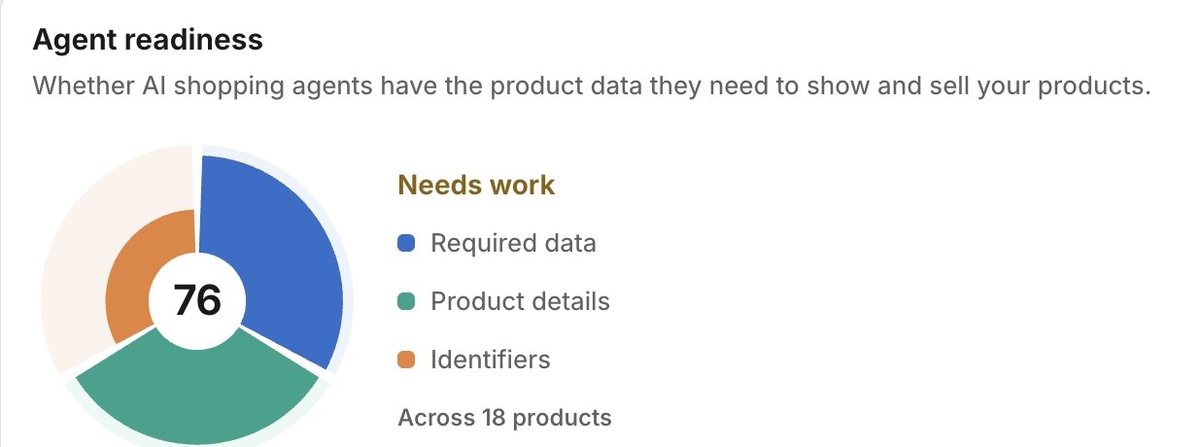
Required data is price and availability, the two facts an agent needs before it can sell anything. It should sit at or near 100%. A gap here means an agent found your product and then couldn't say what it costs or whether the shopper can have it.
Product details is description, image and product type. It's what an agent quotes when someone asks "which of these is better for beginners," and what it uses to file the product in the right category.
Identifiers is barcode and brand, which let an agent recognise your listing and another store's as the same item. This group is usually the lowest, and that isn't always a problem. Handmade and many private-label products have no manufacturer GTIN, and Google is explicit: "When in doubt don't provide a GTIN (for example, don't guess or make up a value)." A 40% here on a store of handmade ceramics is the honest number. On a store reselling branded electronics, it means the supplier's barcodes never made it into Shopify.
Finer attributes like material, size and colour are a separate topic, covered in the product attributes AI agents check.
High versus medium
Price, availability and image are High priority, because each can take a product out of the running: no price or no image fails Shopify Catalog's rules, and nobody can buy an item that can't be bought right now. Description, barcode, brand and product type are Medium. Products missing them still show up, just less often and with less to say.
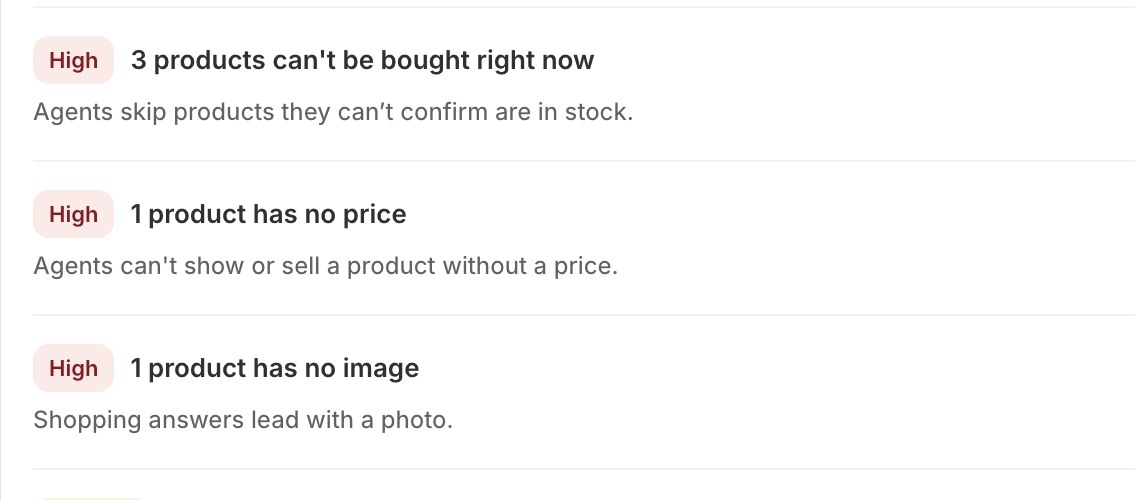
The gap list puts High above Medium, then sorts by how many products each gap hits. Keep that order even when the counts tempt you otherwise. In the store above, 18 products lack a barcode and 3 can't be bought. The barcode gap is bigger, but those 3 products decide whether an agent can sell them at all, and each is a single edit in Shopify.
Fixing it in an afternoon
For a small catalog, this order fits in an afternoon. If you have hundreds of products without barcodes, step 7 alone can take days, because tracking down real GTINs is slow.
- Run the check and note the overall score and the three group numbers.
- Fix prices. A $0 product is usually a published draft, a free sample or a gift-with-purchase. If it really is free, accept that Shopify Catalog will leave it out.
- Fix availability. For each product nobody can buy, restock it, turn on "Continue selling when out of stock" if you can genuinely fulfil backorders, or archive it if it's discontinued. Archiving also removes it from the check, which is right: an agent shouldn't offer it.
- Add a featured image wherever one is missing. One clear shot on a plain background passes.
- Rewrite short descriptions. Under 50 characters fails, which catches every "Classic tee." one-liner. Write what an agent needs to answer questions: material, sizes or dimensions, who it's for, how it differs from its neighbours.
- Fill product type and brand. Keep types consistent: "Snowboard" on every snowboard, not a mix of "Snowboards", "board" and "snow board".
- Add barcodes last. Copy real GTINs from supplier sheets or packaging; for your own brand they come from GS1. No GTIN, no entry.
- Check again and compare with step 1.
Keeping it from slipping
The score drops in predictable ways. A CSV import or supplier app creates products with one-line descriptions. A popular variant sells out and nobody turns on backorders. A placeholder goes live at $0. Shopify doesn't alert you to any of these.
Two habits cover most of it. Re-run the check after any bulk import or catalog change, rather than on a calendar. And add the High fields to your product-creation routine: a price above zero, a sellable variant, a photo. Shipping and returns data drifts the same way; see how AI agents read shipping and returns.
Doing this in Seokai
The Agent readiness card lives on the Structured data page, and running it is free on every plan. Alongside the score and groups, it lists the Most common gaps and Products to fix first, which shows your lowest-scoring products with the fields each one is missing.
Each gap comes with one action:
- Price, availability, image, barcode and brand get Open in Shopify. Seokai can't set prices, stock, photos or barcodes; that data has to come from you. The button saves you hunting for the product.
- Short or missing descriptions get Write descriptions. It opens Seokai's product list filtered to those products, where AI drafts descriptions at 0.5 credits each. Nothing is saved until you review and click Save.
- Missing product types get Suggest types on paid plans: 0.25 credits per product, and it only fills empty fields.
Two limits to know. The check reads up to 50 products per run, so on a big catalog the score describes a sample. And it doesn't run on a schedule; click Check again after changes. The weekly Site audit does flag missing and short descriptions store-wide, which catches the most common slip.
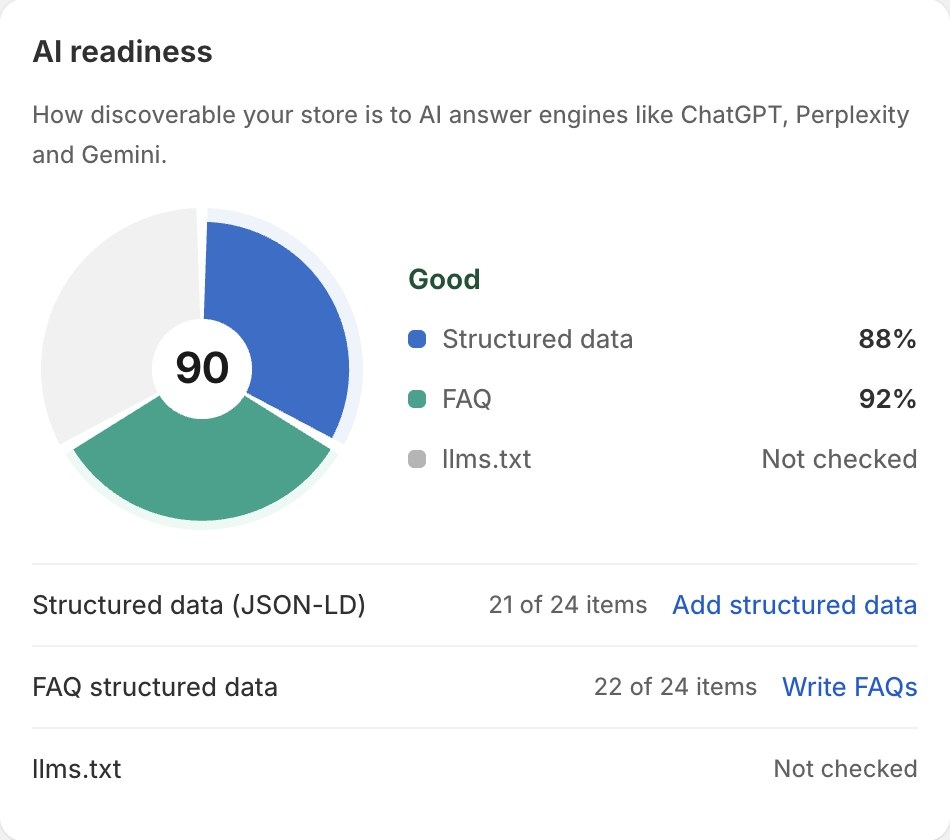
The AI readiness score on Home answers a different question: whether AI answer engines can read your store at all. It weights structured data at 50%, FAQ at 30% and llms.txt at 20%, and the llms.txt part only counts once Seokai has checked what your storefront actually serves. Add structured data leads to setup. Writing the JSON-LD needs a paid plan, and you paste a snippet into your theme and remove the theme's built-in JSON-LD so the markup isn't duplicated. Write FAQs takes you to the Structured data page. Browser-based agents are a separate case, covered in WebMCP and agent checkout.
A score is only a proxy. The real test is whether an agent can answer three questions about every product: what is it, what does it cost, and can I buy it today. Once each product passes, the work becomes catching the next import before it breaks one.
Share this Story