AI visibility vs agent readiness: two problems, one weekly routine

Since March, Shopify has been making stores' products discoverable inside ChatGPT by default. Agentic Storefronts launched switched on, with product data "syndicated through the Shopify Catalog so AI assistants can surface relevant items." Your prices, stock levels, barcodes and descriptions are probably already in front of AI systems. What you control is whether that data is any good, and whether the assistant brings your store up when a shopper asks.
Those sound like one job. They're two, and it's easy to fix whichever half you noticed first and then wonder why nothing moved.
Two different questions
AI visibility asks whether AI assistants recommend you when shoppers ask. Someone types "best beginner snowboard under $300" into ChatGPT. Does your store appear in the answer, with a link, or does the assistant name three competitors and a Reddit thread? This is a relevance and reputation problem. It depends on whether your pages answer the question being asked, what the rest of the web says about you, and whether AI crawlers can read your store at all.
Agent readiness asks whether an AI agent can read your product data and trust it enough to act. Agents don't stop at naming a product. They compare it, check it can be bought, and send the shopper on to buy. For that they need a price, a clear stock status, an image, a description that answers questions, and identifiers like a GTIN that match your product to the same item elsewhere. This is a data quality problem.
Our guide to GEO covers how assistants choose sources, and Is your Shopify store ready for AI agents? goes deeper on agents. This post is about why you need both and how to keep both in shape without it becoming a second job.
They fail in different ways
A visibility failure makes no noise. The shopper asks, the assistant answers, your store isn't in it, and you never hear about the conversation. Nothing shows up in your analytics, because there was never a visit. The usual causes:
- Your product page doesn't say who the product is for, so it can't match "for beginners" or "for wide feet."
- There's no FAQ, so the page answers none of the follow-up questions shoppers actually type.
- Your robots.txt blocks AI crawlers, sometimes because of a setting you never chose.
- Review roundups, marketplaces or bigger competitors answer the question better and get cited instead.
A readiness failure is just as quiet, but it happens one step later. The assistant may know your product exists. Then the agent tries to confirm the details and can't. One variant has no price. Stock is unclear. There's no barcode, so it can't tell your board is the same model a larger retailer sells, and it goes with the listing it can verify. Nothing is wrong with your brand. The data leaves the agent unsure, and an unsure agent moves on.
Neither problem is rare. In Adobe's May 2026 analysis of more than a trillion visits to US retail sites, the share of site content AI could read ranged from 63% in cosmetics down to 47% in furniture and home.
Why fixing one doesn't fix the other
Picture a store with flawless data: every product has a GTIN, accurate stock and clean structured data. If its descriptions never say what problem a product solves and nobody writes about it, ChatGPT still won't name it for "best snowboard for icy conditions." Clean data makes you easy to act on. It doesn't make you the answer.
Now flip it. A store gets mentioned often because a popular blog loves its wax. An agent tries to act on that, finds two of three variants with no stock status and no barcode, and recommends a listing it can check. The mention did its job and the data threw it away.
So the two need separate checks. One looks outward at what assistants say when real questions are asked. The other looks inward at what your catalog tells a machine. A single "AI score" that blends them hides whichever half is broken.
What's at stake for a small store
Adyen's retail research found AI assistant use among US shoppers went from 12% to 35% in a year, and 51% said they'd be open to AI handling the whole purchase. NIQ found 42% of US consumers had used an AI tool to shop in the past month. That traffic also tends to convert well, which we covered in AI traffic conversion data for 2026.
The more sobering number is in the same NIQ study: only 5% had used a fully autonomous agent to place an order. Agents buying on their own are still rare. Assistants recommending products are already normal. That sets the order of urgency. Visibility affects sales now. Readiness matters more each month, and it's cheapest to fix while the stakes are low, not in the week before Black Friday.
For a small store, the real issue is the shape of the answer. A Google results page has ten links and a page two. A ChatGPT answer usually names a handful of options. A big retailer that misses one answer still turns up in others. A store with forty products that misses it doesn't turn up at all. The upside runs the same way: an assistant has no reason to prefer a big brand over a small store with a better-matched page and cleaner data. And forty products is few enough that you can close every gap, which a retailer with 200,000 SKUs can't say.
A 30-minute weekly routine
This doesn't need a project plan. It needs a fixed half hour, the same day each week.
- Check both sides (5 minutes). Which tracked shopper questions were you recommended for this week, which did you lose, and who was picked instead? Then scan your agent readiness gaps by severity. You're looking for changes, not a perfect score. How to measure AI visibility covers choosing questions, and share of model explains why "who got picked instead" is the number to watch.
- Fix the top gaps (15 minutes). Start with the two or three highest-priority readiness gaps, because they're usually quick: a missing price, a sold-out product still shown as buyable, a missing image. Then make one visibility fix aimed at a question you lost. Add an FAQ to the product that should have been picked, or rewrite its description so it says who it's for.
- Keep new products covered (5 minutes). New products are where gaps creep back in. Check that anything added this week has a price, stock tracking, an image and a barcode if it has one. If automation writes your search titles and alt text, confirm it ran.
- Review the weekly report (5 minutes). Did last week's fixes move anything? Visibility moves slowly and unevenly, so read the trend over several weeks. If a fix lined up with a gain, do more of that kind of fix.
The agent readiness score explainer breaks down what each readiness check measures.
How Seokai covers the routine
We built Seokai around this split. Here's how each step maps to the app, limits included.
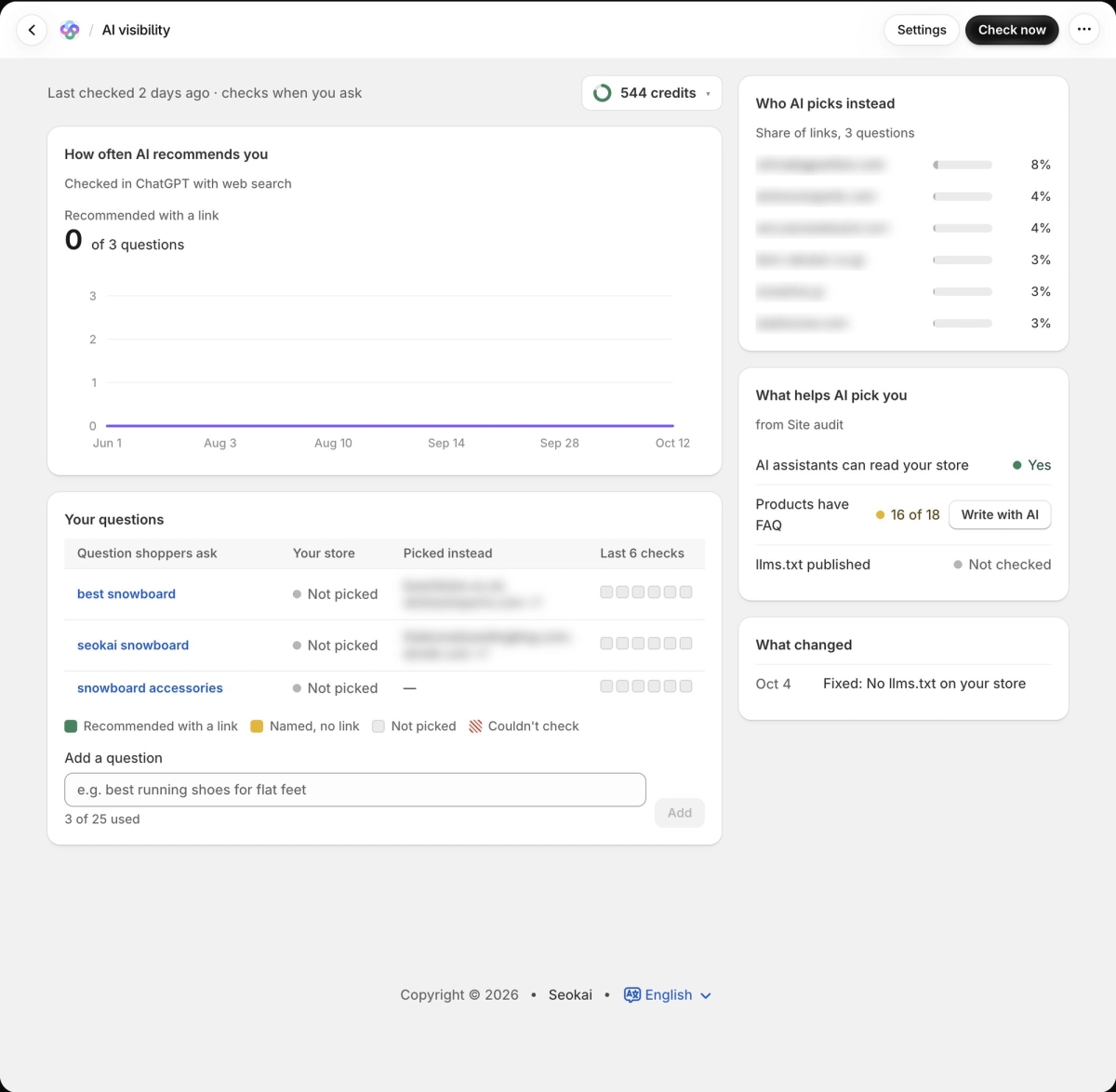
Step 1, visibility. The AI visibility page tracks up to 25 shopper questions, suggested from your products and collections. Each is run through ChatGPT with web search via OpenAI's API and marked as recommended with a link, named without a link, or not picked. For each question you see who was picked instead, and a "What helps AI pick you" panel pulls relevant fixes from the site audit. It can run on a weekly schedule. Two caveats: it checks one engine, and an API answer only approximates what a shopper sees in the ChatGPT app, so read it as a trend. AI visibility is on paid plans.
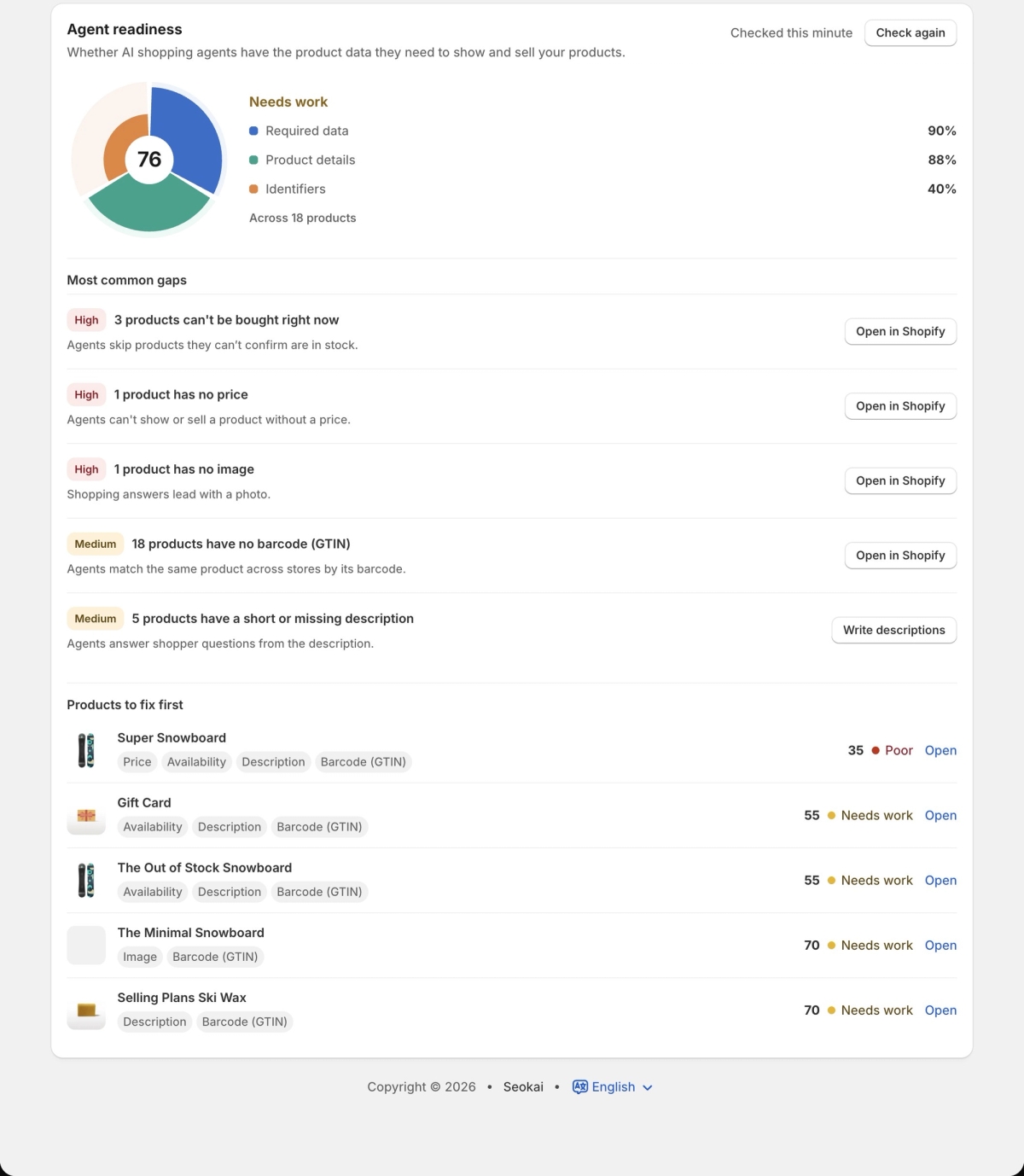
Step 1, readiness. Agent readiness sits on the Structured data page. It scores products on Required data, Product details and Identifiers, lists the most common gaps by priority, and ranks the products to fix first. Home also shows an AI readiness score built from structured data, FAQ coverage and llms.txt.
Step 2. Descriptions, FAQs and search appearance can be written with AI in the editor, or across many items with Bulk update (Growth and up). Seokai can't change price, stock or barcodes. Those live in Shopify, so for those gaps the app links you to the product in Shopify admin.
Step 3. Automation (Growth and up) writes search appearance for new products and collections, and alt text for new product images that have none. It runs when an item is created, not when it's edited. If your credits run out, items added during the pause are skipped, and Bulk update is where you catch them up.
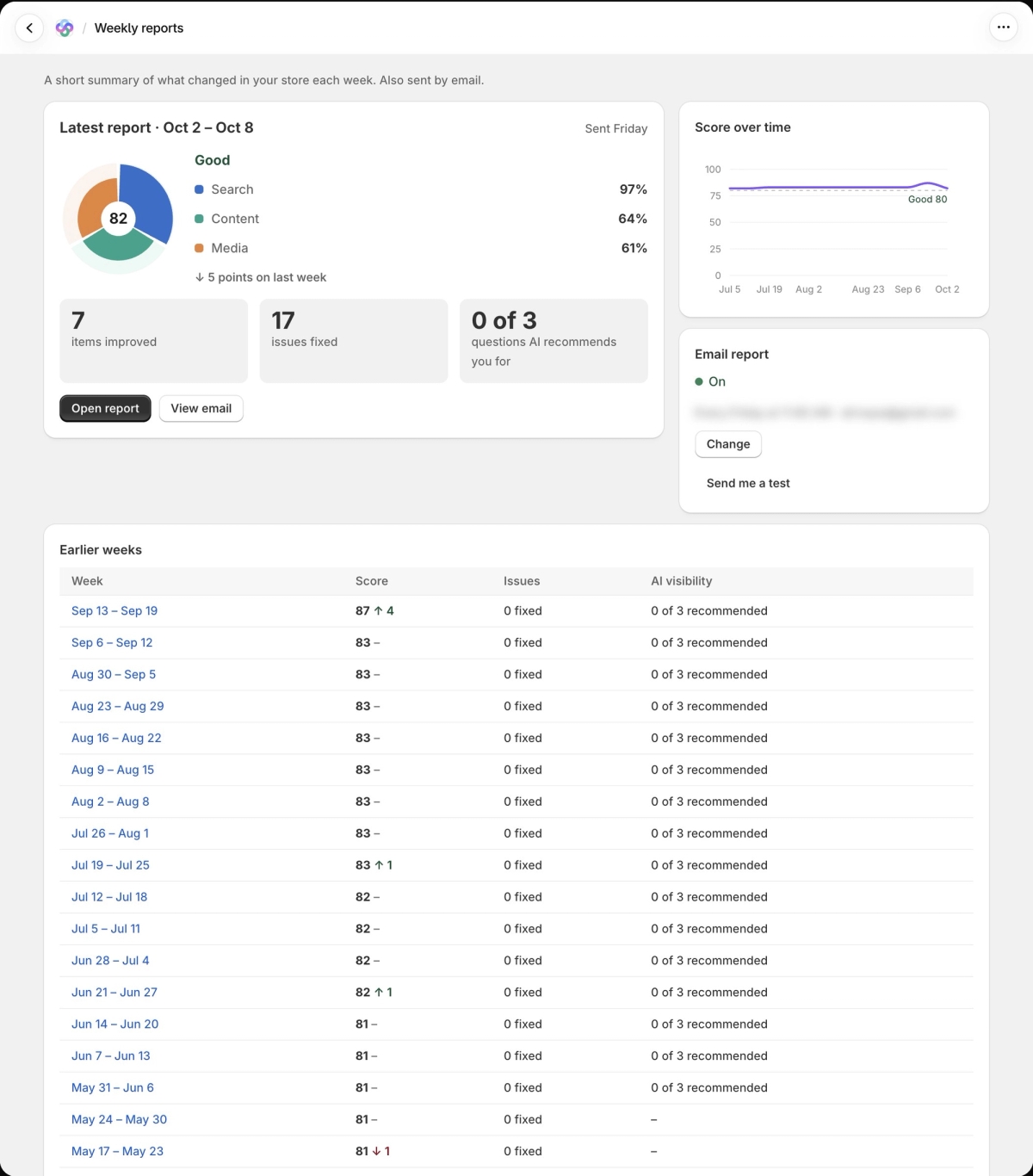
Step 4. The weekly report email (Growth and up) puts your store score, what changed, what needs attention, AI visibility results and a tip for next week in one place. For the longer view, Statistics charts your score over time with changes marked, so you can see which fixes moved it.
Named, then bought
Visibility gets you named. Readiness means the shopper can buy the thing you were named for. Shopify already makes eligible products available to ChatGPT, so what's left to decide is what that catalog says and whether anyone asks for it. Thirty minutes a week covers both. With forty products instead of forty thousand, you can get every one of them right.
Share this Story