How to Measure Your Shopify Store's AI Visibility
For about a week in October 2026, ChatGPT stopped adding its usual chatgpt.com source tag to the links in its answers. Adobe's Cedric Huesler watched a set of roughly 500 pages lose about 31,000 ChatGPT visits a day while Direct traffic on the same pages rose by about 26,000. On October 15 he confirmed it was a bug and the tags were back (Search Engine Roundtable).
The shoppers hadn't changed. Only the label had. If one missing URL parameter can make most of a channel disappear from your reports, then your reports can't tell you whether AI assistants recommend you.
This post covers the measurement side: what to ask, what to record, how often to check, and what to do with the results. For the broader strategy, start with how to rank your Shopify store in AI search.
Why it's worth an hour a week now
Adobe tracks more than a trillion visits to US retail sites. It found that AI-referred traffic grew 138% year over year in May 2026 and converted 54% better than traffic from other sources (Digital Commerce 360). Shopify says AI-driven traffic to its stores grew eightfold year over year in the first quarter. Its Agentic Storefronts channel now sends eligible products to ChatGPT and Microsoft Copilot by default, and to Google AI Mode and Gemini for select brands (Shopify).
For most stores this is still a small share of traffic. What makes it different is the shape: one answer decides which three or four shops a shopper hears about at all. If you're left out, you don't drop to position eight. You just aren't there.
Why Google Analytics can't show you this
Analytics records visits. An AI recommendation only turns into a visit when the shopper clicks, and that visit still has to arrive with its source attached. There are three gaps:
- No click, no record. ChatGPT names your brand, and the shopper searches for you a day later or buys from someone else. Nothing ever reaches your analytics with ChatGPT attached.
- Clicks that lose their source. GA4 files a visit as Direct when it has no referrer and no source tag. App navigation, copied links and noreferrer links can strip one or both (Clickport). The October bug was the same problem on a large scale.
- Losses don't show up. Analytics shows who came. It has no way to show the questions where an assistant recommended someone else.
Shopify admin now attributes orders placed through Agentic Storefronts to the AI channel that drove them, which helps. But it only counts the sales you won. The only way to see the ones you missed is to ask the questions yourself and record what comes back.
Build a set of real shopper questions
Your measurement is only as good as your questions. Share of model as a KPI explains how to balance broad, comparison and brand questions. The short version: write questions the way shoppers talk, not the way you'd write a keyword.
Good places to find them:
- Your support inbox and chat logs. "Is this okay for wide feet?" beats anything you'll make up.
- Your store's search box. What people type there is close to what they'd ask an assistant.
- Reviews, especially the sentences that explain why someone bought.
- Google Search Console queries of four words or more. Long queries tend to already read like questions.
Then trim the list. Keep the questions where a recommendation could lead to a sale. "Best snowboard for a beginner under $400" earns a place. "How to wax a snowboard" usually doesn't, unless you sell wax. Add the limits shoppers actually set: budget, size, use case, location. One or two broad questions like "best snowboard" are worth keeping as benchmarks, but expect big brands to own them.
Then freeze the set. You can add questions later. But if you reword them every week, you end up measuring your own edits instead of the assistant.
What to record for each question
Each check gives every question one of four results:
- Recommended with a link. The answer names you and links to your store. This is the only result that can send a shopper straight to you.
- Named, no link. You're in the answer, but the shopper has to go find you. That's better than nothing, and it's a separate problem. Brand mentions vs product citations explains why the link goes missing.
- Not picked. The answer recommends other shops.
- Couldn't check. The run failed. Record it anyway so a failed run doesn't count as a loss.
Next to each result, write down who got picked instead: the domains the answer linked to. This often turns out to be the most useful column. It shows who you're really up against for each question, and it's often not the competitor you would have named. Expect review sites, marketplaces and forum threads alongside other stores.
How often to check
Check weekly. Daily checks mostly measure randomness. SparkToro ran 2,961 prompts through ChatGPT, Claude and Google's AI. The chance of getting the same list of brands twice was below 1 in 100, and the chance of getting the same order was about 1 in 1,000 (SparkToro). The pool of brands was what held steady: the same few kept appearing, in a different order each time.
So don't track a position. Track how many of your questions recommend you, week over week. For any single question, look at its last several results, not just the latest one.
How to read changes
A few rules that prevent false alarms:
- One week is noise. Three weeks is a pattern. A question that flips between Not picked and Recommended means you're on the edge of the pool. A question that stays Recommended for a month is yours, for now.
- Watch the total. Going from 3 of 20 to 6 of 20 over a month means something. One question changing doesn't.
- Keep a log of your changes. Note what you changed and when: a rewritten description, a new FAQ, a robots.txt fix. Without dates you'll credit the wrong change.
- When you drop, check who replaced you. If one new domain shows up across several questions at once, the change is probably on their side, like a new product or a new roundup article, not yours.
- Look for drops on every question at once. If every question falls in the same week, suspect something on the assistant's side before you blame your store.
What to fix when you're not picked
Start with who got picked instead. It tells you what kind of problem you have.
- The answers link to review sites and forums, not stores. The assistant relies on third-party sources for this question, so work on your own pages won't be enough. You have to show up in those sources. The off-site GEO playbook covers how.
- The answers link to competitors' product pages. Open them next to yours. Theirs usually say plainly who the product is for, list specs, and answer the obvious questions on the page. Yours may lean on photos and a tagline. Rewrite the description to say who the product is for, and add an FAQ that answers the question you're tracking.
- You're named but not linked. The assistant knows your brand but can't find a page that backs up the claim. Make sure a specific product or collection page does.
- You're never in any answer. Check access first. OpenAI says sites that block its OAI-SearchBot crawler "will not be shown in ChatGPT search answers" (OpenAI). Look for that crawler and other AI crawlers in your robots.txt, and confirm your product pages have structured data.
Fix one thing at a time, then give it three or four weekly checks before you judge it.
Doing this in Seokai
Seokai's AI visibility page runs this whole loop. Here's what it does and where it stops.
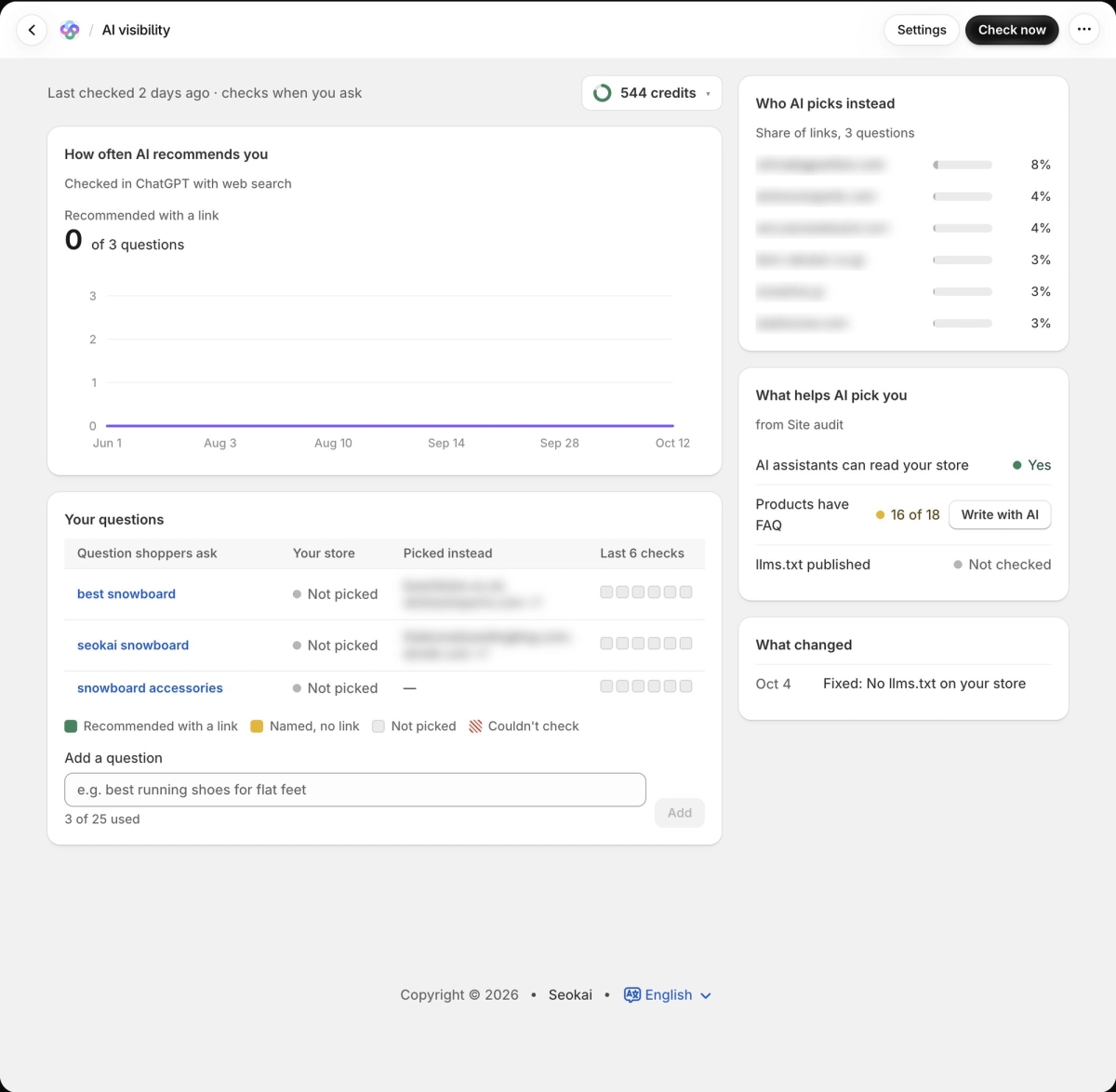
You add up to 25 questions, and the app can suggest some from your catalog. Each question is checked in ChatGPT with web search. More precisely, Seokai sends it through OpenAI's API with web search turned on, not through the ChatGPT app a shopper opens. So read the results as a close approximation, not a copy of what every shopper sees. Seokai doesn't check Gemini, Perplexity or other assistants.
The How often AI recommends you card counts the questions where you were recommended with a link and charts that number over time. In Your questions, each row shows the latest status (Recommended with a link, Named no link, Not picked, Couldn't check), the domains picked instead, and the last six checks. That gives you a pattern to read instead of a single result.
On Scale and higher plans, Who AI picks instead totals those domains across all your questions as a share of links. It's the quickest way to spot a competitor or review site that dominates your category.
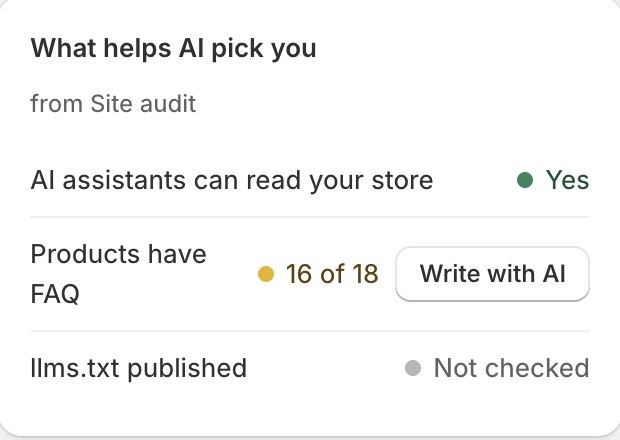
What helps AI pick you pulls three checks from Site audit: whether AI assistants can read your store, how many products have an FAQ (with a Write with AI button to fill the gaps), and whether an llms.txt is published. Open a single question to see How to get picked, which lists fixes for that question, such as a product description that doesn't say who it's for. If your recommendations go up after you fix something, the page shows which fixes came first. That shows timing, not proof that the fix caused it.
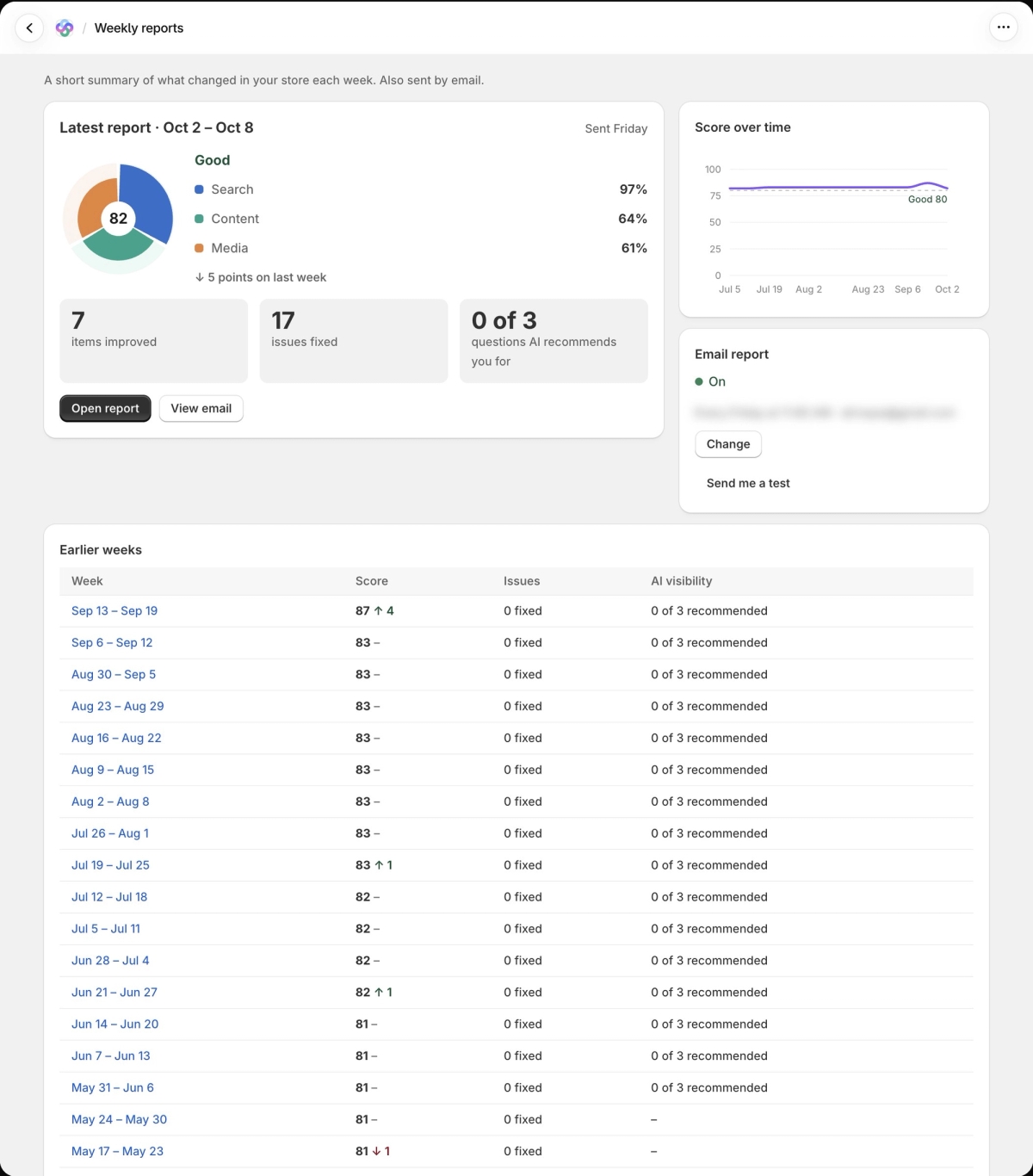
Turn on the weekly schedule in settings and the checks run by themselves. Manual checks are limited to two per hour. Results also go into the weekly report email.
There are limits. Twenty-five questions is fewer than the 30 to 60 suggested in our share-of-model post, so choose the 25 that matter most. AI visibility is only on paid plans. And a page full of Not picked is a real result.
Where to start
Take ten questions from your support inbox this week and run them. Write down who got picked instead, then open the first three of those pages next to yours. That side-by-side will likely teach you more than any line on a chart.
Share this Story