Why Use Backups?
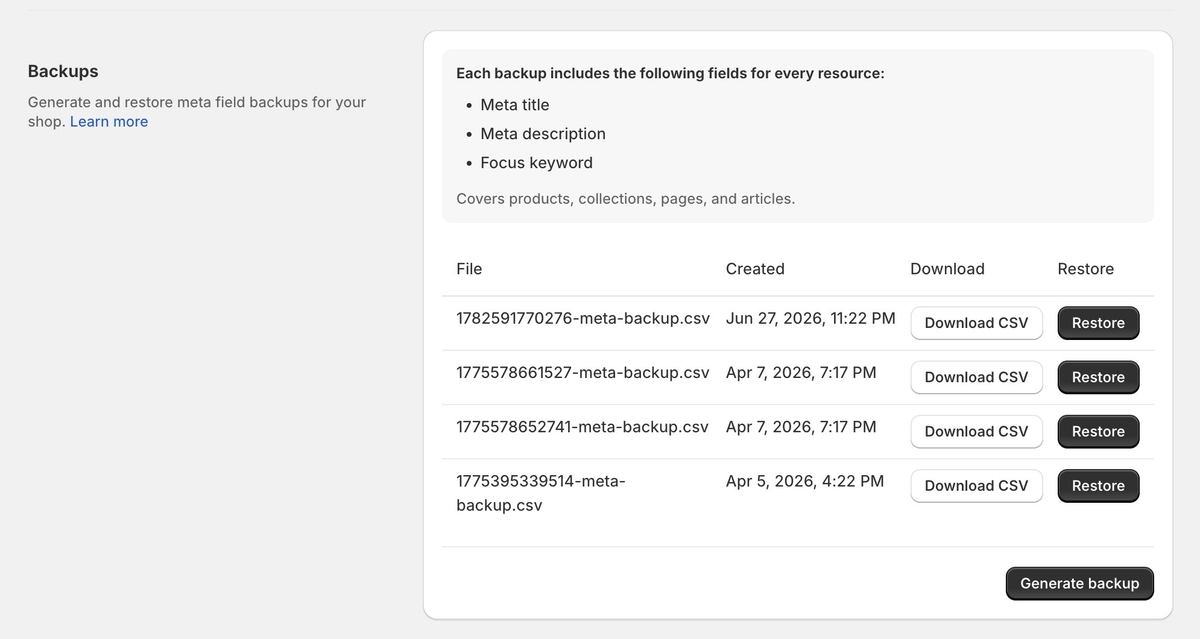
A backup is a CSV file with the meta title, meta description and focus keyword of every product, collection, page and blog post in your store. Make one before a large change, such as a bulk update set to Save automatically, so you can roll everything back in one step.
Backups don't include product titles, descriptions, image alt text or FAQs. To undo a change to those on a single item, use Restore previous version in the item's History in the editor.
Creating a Backup
Open Settings from the Seokai menu and scroll to Backups. Click Generate backup. The new file appears in the list with the date and time it was created. Click Download CSV to keep a copy on your computer.
Restoring a Backup
Click Restore next to the backup you want. A dialog asks you to confirm and warns that this overwrites your current data: anything created or changed since the backup was made is replaced, and the restore can't be undone. Confirm to start. Seokai shows "Restore in progress" until it finishes.
If you might want to return to your current values later, generate a new backup before you restore an older one. Backups are free on every plan.