What is Automation?
Automation handles new items for you. When you add a product or collection in Shopify, Seokai writes its search appearance, and alt text if you choose, and saves it straight to your store.
Automation runs when an item is created, not when you edit it later. The one exception is the redirect switch, which reacts when a web address changes. Every automatic change is recorded in the item's History in the editor, so you can restore the previous version if you don't like it.
Available Automations
New products: search appearance
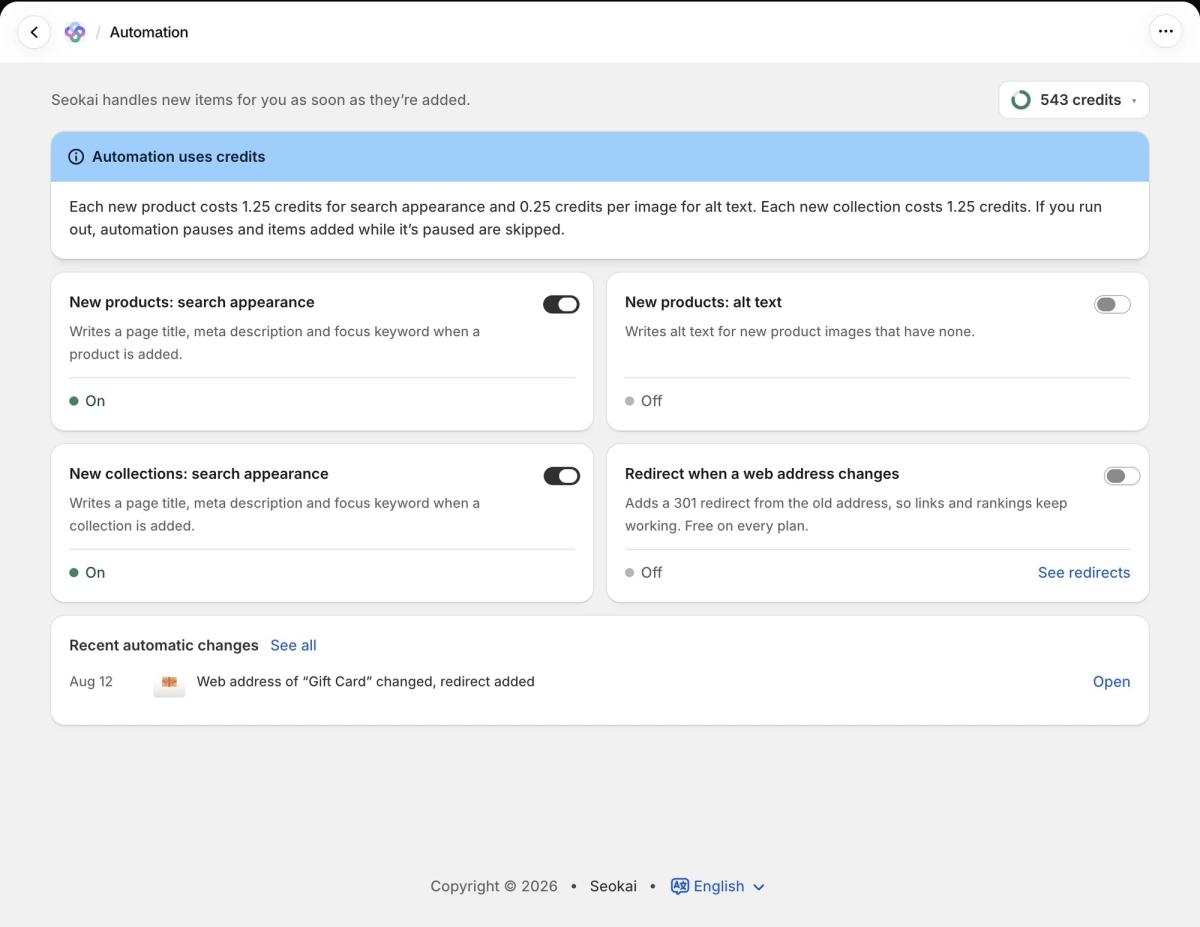
Writes a page title, meta description and focus keyword when a product is added. Costs 1.25 credits per product.
New products: alt text
Writes alt text for new product images that have none. Costs 0.25 credits per image.
New collections: search appearance
Writes a page title, meta description and focus keyword when a collection is added. Costs 1.25 credits per collection.
Redirect when a web address changes
When you change the URL handle of a product or collection, Seokai adds a 301 redirect from the old address, so existing links and rankings keep working. This works for products and collections, not pages. It is free. See redirects opens the Redirects page.
How to Turn It On
Open Automation from the Seokai menu. Each automation has its own card with a switch, and the status under it shows On or Off. Changes take effect as soon as you flip the switch.
Recent automatic changes at the bottom lists what Seokai did on its own. Click Open on an entry to go to that item, or See all for the full list.
When You Run Out of Credits
If your credits run out, automation pauses. Items added while it is paused are skipped and are not handled later. Automation starts again when your monthly credits renew or when you buy more. To catch up on skipped items, use the Bulk update page.
Plan Requirements
The three AI automations are available on Growth and higher plans. Redirect when a web address changes is free on every plan, including Explorer.